Your robot vacuum works hard, but only if you help it out. An overflowing Roomba bin is one of the fastest ways to kill suction, trigger clogs, and leave your floors dirtier than when you started. The good news: emptying it takes maybe three minutes, and maintaining the bin properly extends your machine’s lifespan. This guide walks you through the process step-by-step, plus troubleshooting tips for common headaches so your Roomba stays happy and your floors stay clean.
Table of Contents
ToggleKey Takeaways
- Emptying your Roomba bin after every cleaning cycle or at 75% capacity prevents suction loss, motor damage, and extends your robot vacuum’s lifespan.
- Empty the bin outdoors or over a sink with gentle tapping (3–4 light taps) to minimize dust dispersal and protect indoor air quality.
- Clean the filter monthly or when it appears gray and caked with dust, as a clogged filter forces the motor to overwork and reduces suction dramatically.
- Always allow the bin to air-dry completely before reinserting it, and rinse with water only—never use soap, which attracts dust and interferes with sealing.
- Common issues like weak suction, dust escape, or mold indicate a full filter, improper bin seating, or moisture retention that can be easily fixed with preventive maintenance.
Why Regular Bin Emptying Matters for Your Robot Vacuum
A full dustbin doesn’t just mean poor cleaning performance, it can damage your Roomba from the inside out. When the bin reaches capacity, airflow gets restricted, forcing the motor to work harder and shortening its lifespan. Debris backing up into the vacuum’s internal passages can clog sensors that tell the vacuum when the floor is dirty, leading to missed spots and confusing runtime data.
Most manufacturers recommend emptying the bin after every cleaning cycle or when it reaches about 75% capacity. Roombas with full bins also get noisier and run hotter, both signs your motor is struggling. Regular emptying keeps suction consistent, prevents unnecessary wear on motor bearings, and catches problems early if debris is leaking into places it shouldn’t be.
Think of it like changing your car’s oil, small routine maintenance beats expensive repairs down the road.
Before You Start: Tools and Preparation
You won’t need much. Have these items ready:
• Roomba (any current model, the process is nearly identical across s-, i-, and j-series vacuums)
• Small waste bin or trash can (a kitchen trash, grocery bag, or even a larger bowl works)
• Dry cloth or paper towel
• Safety goggles or glasses (optional but smart, dust can kick up when you tap the bin)
• Dust mask or respirator (if you’re sensitive to dust or working in a carpeted area)
Do this outdoors or over a sink if possible. Even with careful technique, dust will settle, and outdoor cleanup beats sweeping inside later. If indoors, open a window and avoid hovering directly over the bin as you empty it. Tap the bin gently over the trash can rather than shaking it hard, aggressive tapping does nothing but spreads dust into the air. Keep your dustbin dry before reinserting it: moisture clogs the filter and promotes mold in the internal passages.
Step-by-Step Instructions for Emptying Your Roomba Bin
-
Press the bin release button. Locate the large button on the back or side of your Roomba (placement varies by model). Press it firmly, don’t tap. The bin should pop out easily. If it’s stuck, gently wiggle it side-to-side while pressing the release button.
-
Carry the bin away from your living space. Take it outside or to your kitchen sink. Avoid tilting the bin until you’re over your trash receptacle: dust inside shifts as you move.
-
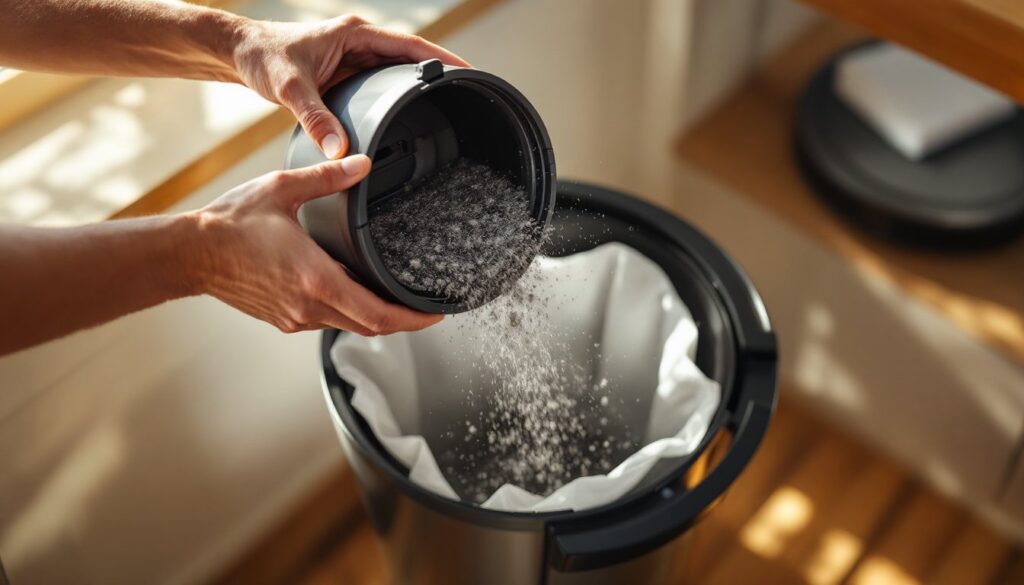
Position the bin over your trash. Hold the bin with the opening facing down, about 12 inches above the trash can. This height gives particles room to fall freely without bouncing back onto your hands or face.
-
Open the dump door or tip the bin. Most Roombas have a release button or latch near the bottom of the bin that opens a flap, letting debris fall out. If yours has no flap, simply tip the bin at a 45-degree angle and let gravity do the work. Tap the bin gently with your fingers on the back edge, three or four light taps are plenty to dislodge stuck debris.
-
Check for clogs or stuck hair. Peer inside with a flashlight if the light is dim. Roombas pick up pet hair and carpet fibers that wrap around internal bristles or jam in corners. A gloved finger or old toothbrush can gently loosen packed-in hair. Don’t force anything, if debris won’t come free easily, soak the bin in warm water for a few minutes.
-
Wipe the interior. Use a dry cloth to wipe the inside walls and floor of the bin. Dust sticks to static electricity, so a quick wipe removes fine particles that the visual inspection missed. Specific techniques for minimizing dust dispertion help preserve your indoor air.
-
Reinsert the bin firmly. Align the bin’s connectors with the slots on the vacuum’s body. Push straight in until you hear or feel a click. The bin should sit flush, no wobbling. Some models require you to rotate the bin slightly to lock it in place.
-
Run a quick spot check. Turn on your Roomba and listen for normal operating sound. If the whirring sounds strangled or high-pitched, the bin may not be seated correctly or debris is still obstructing airflow. Repeat steps 1–7.
Cleaning and Maintaining the Bin After Emptying
A monthly deep clean of the bin keeps your Roomba running strong. Once a month, detach the bin and rinse the interior with lukewarm water only, no soap or detergent. Soap residue attracts dust and interferes with the static seal that keeps debris in the bin during operation. Rinse thoroughly and air-dry completely (at least 2 hours) before reinserting.
Inspect the filter every time you empty the bin. Most Roombas have a mesh filter behind or above the bin that traps fine dust before it escapes into your home. Tap the filter gently over the trash to remove loose particles. If it’s gray or dark with caked-on dust, replace it. Filters cost $20–$40 and last about 3–6 months depending on usage. A clogged filter forces your motor to overwork and reduces suction dramatically.
While the bin is out, steps to prevent dust from escaping during emptying include checking the flap mechanism for wear. If the latch is cracked or the seal is no longer tight, dust escapes during operation. Roombas don’t need much maintenance, but these two components, bin and filter, deserve regular attention. Clean the vacuum’s sensor windows with a dry cloth while you’re at it: dusty sensors confuse your Roomba’s navigation.
Troubleshooting Common Issues When Emptying the Bin
The bin won’t come out. Push the release button hard and straight, don’t rock it. If it still sticks, check for debris jamming the connector pins on the bottom of the bin or grooves in the Roomba’s body. Wipe both clean with a dry cloth and try again. In rare cases, the plastic release mechanism inside the vacuum cracks, and you’ll need a replacement bin assembly ($50–$100 depending on model).
Dust escapes everywhere when I empty the bin. You’re likely tipping or shaking the bin too aggressively. Gravity plus light tapping are all you need. If the dump door latch is loose or cracked, dust leaks while your Roomba operates, not just during emptying. Replace the bin if the latch is damaged.
The bin smells bad or looks moldy inside. Moisture is the culprit. Make sure the bin is completely dry before reinserting it, and avoid emptying it directly into a damp trash can or wet outdoor receptacle. If mold is already present, soak the bin in a 1:1 mix of white vinegar and water for 30 minutes, scrub gently with a soft brush, and air-dry in sunlight (UV kills mold spores). Never use bleach, it degrades plastic seals.
My Roomba’s suction is weak even after emptying. Check the filter first, it’s the most common culprit. A full or clogged filter throttles suction. If the filter is new and clean, make sure the bin is seated flush and the dump door is fully closed. Listen for air leaks around the seam where the bin connects to the vacuum. Finally, check your home’s ductwork and venting, some models require a clear path for air circulation.
Conclusion
Emptying your Roomba bin is quick, painless work that pays dividends in suction power and machine longevity. Make it a habit, empty after every cycle, deep-clean monthly, and replace filters every few months. A little preventive care keeps your robot vacuum out of the repair shop and your floors cleaner. Start today, and you’ll notice the difference in performance within a week.