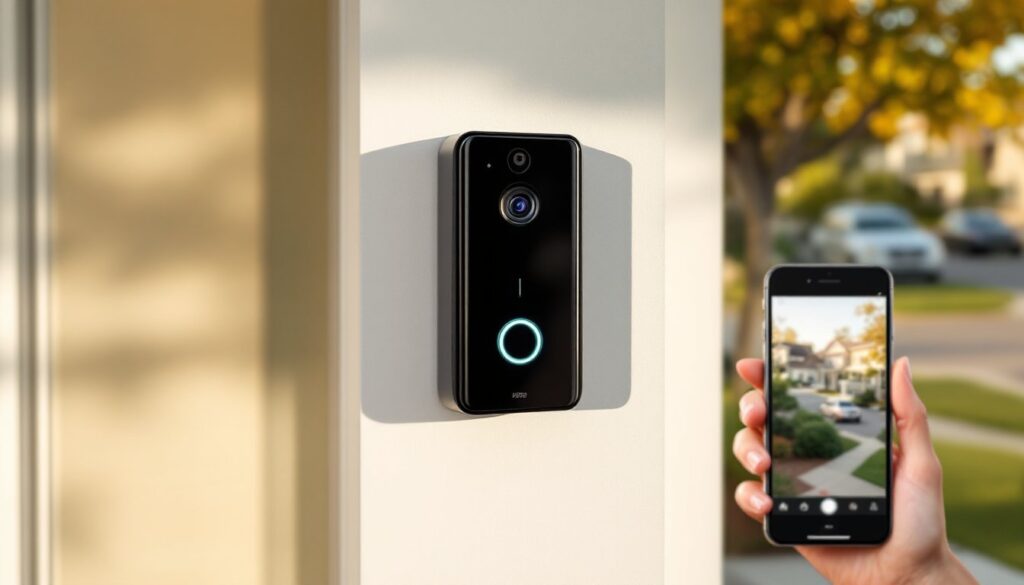
A smart video doorbell is one of the quickest wins in home security, see who’s at your door from anywhere, get instant alerts, and ditch the guesswork. Whether someone’s ringing the bell, a package is arriving, or you’re checking in while at work, a wireless video doorbell gives you real-time visibility and control. Unlike traditional doorbells, smart models store footage, send notifications to your phone, and often integrate with other smart home systems. If you’re thinking about upgrading your home’s security, a wireless video doorbell is practical, affordable, and worth the investment in 2026.
Table of Contents
ToggleKey Takeaways
- A wireless video doorbell provides real-time visibility and two-way audio communication, allowing you to screen visitors and give delivery instructions from anywhere—reducing package theft and unwanted intrusions.
- Smart video doorbell installation is DIY-friendly for most homeowners, taking just 15 minutes for wireless models with no specialized tools, while hardwired options require existing wiring or a licensed electrician for new circuits.
- Prioritize essential features like 1080p or higher resolution, 180-degree field of view, customizable motion detection, night vision quality, and two-way audio clarity over unnecessary add-ons when selecting a wireless video doorbell.
- Ensure strong WiFi signal (at least 2-3 bars) at your front door and check ecosystem compatibility with Alexa, Google Home, or Apple HomeKit before purchasing to avoid integration issues.
- Enable two-factor authentication, verify end-to-end encryption, and opt for hybrid local and cloud storage solutions to protect your video footage and prevent unauthorized access to your smart home security system.
- Budget for potential monthly subscription fees ($5–60 per year) for cloud recording and advanced features like person detection, and verify the brand’s firmware update commitment before investing in a wireless video doorbell.
Why Smart Video Doorbells Are Worth the Investment
A smart video doorbell pays for itself in peace of mind and practical benefits. You’ll reduce package theft, screen visitors before opening the door, and build a security record all in one device. Most homeowners find them easier to install than alarm systems and significantly less expensive than hiring security monitoring services.
The security advantage is immediate. When someone approaches your door, you get a real-time alert on your phone, no matter if you’re at the grocery store, on vacation, or upstairs taking a shower. Two-way audio means you can communicate directly through the doorbell, deter unwanted visitors, and give delivery instructions without being there in person. Smart home tech for beginners no longer means complex wiring: most wireless models run on batteries or existing doorbell wiring, making them accessible to any DIYer.
Cloud storage and local backup mean your video footage is protected and retrievable. If anything unusual happens at your door, suspicious activity, a delivery gone wrong, or package theft, you have timestamped proof. Many homeowners use this footage to identify porch pirates or provide evidence to police. It’s a deterrent on its own: just knowing a camera is watching significantly reduces theft and unwanted behavior.
Key Features That Matter Most
When comparing wireless video doorbells, focus on features that actually make a difference in daily use. Video resolution matters, look for 1080p or higher (ideally 2K or 4K) so you can see faces and package details clearly. A 180-degree or wider field of view keeps your entire porch in frame, not just a narrow cone.
Night vision quality is worth testing. Infrared (black-and-white) night vision is standard, but some models now offer color night vision, which is far superior for identifying people and vehicles. Low-light performance separates a useful doorbell from a frustrating one.
Motion detection and alerts should be customizable. You want notifications when someone approaches, but not every time a leaf blows by or a car passes. Look for adjustable sensitivity zones and the option to schedule quiet hours so alerts don’t wake you at midnight.
Two-way audio clarity needs testing too. Cheap speakers sound tinny and distorted: better models have clear full-duplex audio so you and visitors can have normal conversations. Person detection using AI is a game-changer, it distinguishes people from pets and packages, reducing false alerts by half.
Check battery life if you’re going wireless. Some doorbells last weeks on a charge: others need monthly top-ups. Hardwired models don’t need batteries but require existing wiring or a new doorbell circuit. Smart home tech examples show that integrating a doorbell with other devices, smart locks, lights, and hubs, unlocks automation possibilities like unlocking the door for a trusted delivery service or turning on porch lights when motion is detected.
Installation and Setup Guide
Most wireless video doorbells are genuinely DIY-friendly, though some jobs require thinking ahead.
For wireless battery-powered models:
- Choose a location with good WiFi signal and a clear sightline to your porch
- Charge the device fully before installation
- Mount the bracket securely to your door frame or wall using provided screws and anchors
- Snap or screw the doorbell onto the bracket
- Download the manufacturer’s app and follow pairing instructions
- Test video, audio, and motion detection before finalizing placement
Wireless models are fast, installation takes 15 minutes tops. No tools beyond a screwdriver needed.
For hardwired models:
These connect to existing doorbell wiring, bypassing battery limitations. If your house already has a doorbell circuit and transformer (common in homes built after 1970), hardwired setup is slightly more involved but still manageable.
- Turn off power at your main breaker, non-negotiable for safety
- Disconnect the old doorbell and remove it from the wall
- Run the new doorbell’s power wires into the existing wire hole (or drill a small hole if needed)
- Connect the wires to your existing transformer terminals using a junction box or direct connection per the manufacturer’s guide
- Mount the new doorbell faceplate
- Restore power and pair the device via the app
Critical note: If your home doesn’t have existing doorbell wiring, you’ll either need to install a new circuit (hire a licensed electrician, this requires a permit in most jurisdictions) or stick with wireless. Don’t attempt to run new circuits without proper licensing and permits: it violates code and voids insurance.
WiFi setup is straightforward on both types. Most use a 2.4GHz band (5GHz models are less common because range suffers through walls). Position your router or mesh system close enough that your porch gets strong signal, at least 2-3 bars. Weak WiFi means delayed notifications and video lag, which defeats the purpose. How to get started with smart home tech includes these foundational steps.
Connectivity and Compatibility Considerations
Your smart video doorbell needs to play well with your existing ecosystem. Most major models support Amazon Alexa, Google Home, and Apple HomeKit, but compatibility varies, and not all brands support every platform equally.
Ecosystem lock-in is real. If you’re deep in Alexa, Ring integrates seamlessly. On the Google side, Nest and Arlo cameras offer native integration. Apple HomeKit is stricter about security but more limited in device selection. Don’t assume a doorbell labeled “compatible” will work flawlessly with all your other smart devices, test before committing, or buy from a brand whose whole ecosystem you’re adopting.
WiFi bandwidth matters more than many realize. A video doorbell streaming 1080p+ footage continuously uses meaningful bandwidth. If your home WiFi is strained (gaming devices, streaming services, security cameras), add a dedicated mesh node near your front door. Many wireless internet providers now cap monthly data: check your plan before installing.
Hub requirements differ by brand. Some doorbells work standalone via cloud connection: others need a local hub (Echo device, Home Hub, or a brand-specific hub) for backup and faster response. Hardwired doorbells are often more reliable because they have consistent power: wireless ones depend on batteries and WiFi, both variables.
Before buying, check whether the doorbell requires a paid subscription for advanced features like cloud recording, person detection, or extended clip history. Many offer free basic service (live view, alerts) but charge monthly for cloud storage. That recurring cost compounds, $5/month = $60/year. Budget accordingly.
Security Features You Need to Know
A smart doorbell is only as secure as its implementation. Encryption protects your video from prying eyes. Reputable brands use end-to-end encryption for video streams and local storage options, meaning footage stays yours and isn’t freely accessible to hackers. Avoid no-name brands without clear privacy policies.
Two-factor authentication on your doorbell app prevents someone from taking over your account after a password breach. Enable it, yes, it’s one extra step, but attackers gain doorbell access far too easily without it.
Local storage vs. cloud-only is a real choice. Cloud storage (Amazon, Google, or brand servers) is convenient, you access footage anywhere, but creates privacy concerns and potential third-party exposure. Some doorbells offer microSD cards for local recording, keeping footage on your device. Hybrid setups (local backup + cloud sync) are the gold standard but cost more.
Privacy zones let you mask portions of the video feed. If your neighbor’s driveway or a street-facing window is in the frame, you can blur it out. Respectful neighbors appreciate this.
Firmware updates matter. Buy from a brand committed to regular updates. Doorbells without updates sit vulnerable to newly discovered exploits. Check online reviews for update frequency before purchasing.
Recent best video doorbell reviews test security alongside performance, use those as baselines. Digital Trends also covers smart home security in depth. Trusted sources test real-world footage quality and security practices, not just marketing claims.
Conclusion
A smart video doorbell is one of the highest-ROI home security upgrades available to DIY homeowners. It’s quick to install, affordable, and delivers immediate value in visibility and safety. Choose a model matching your ecosystem, test your WiFi beforehand, and prioritize features, night vision, motion detection, and two-way audio, over bells and whistles. Installation is a Saturday morning project: the security payoff lasts years. If you’re exploring smarter home systems, this is the device to start with.